My Lightning Tracker & Alerts
- 4.7
- Rating
- 1.00M
- Installs
- Free
- Price

 Analysis by App-foxy
Weather apps usually answer a simple question: will it rain? My Lightning Tracker & Alerts is built around a more specific concern: where lightning is being detected and how quickly you need to know about nearby thunderstorms. After spending time with it, I see it as a focused companion for people who work, travel, exercise, or plan outdoor activities around storm risk rather than as a complete replacement for a broad daily forecast app.
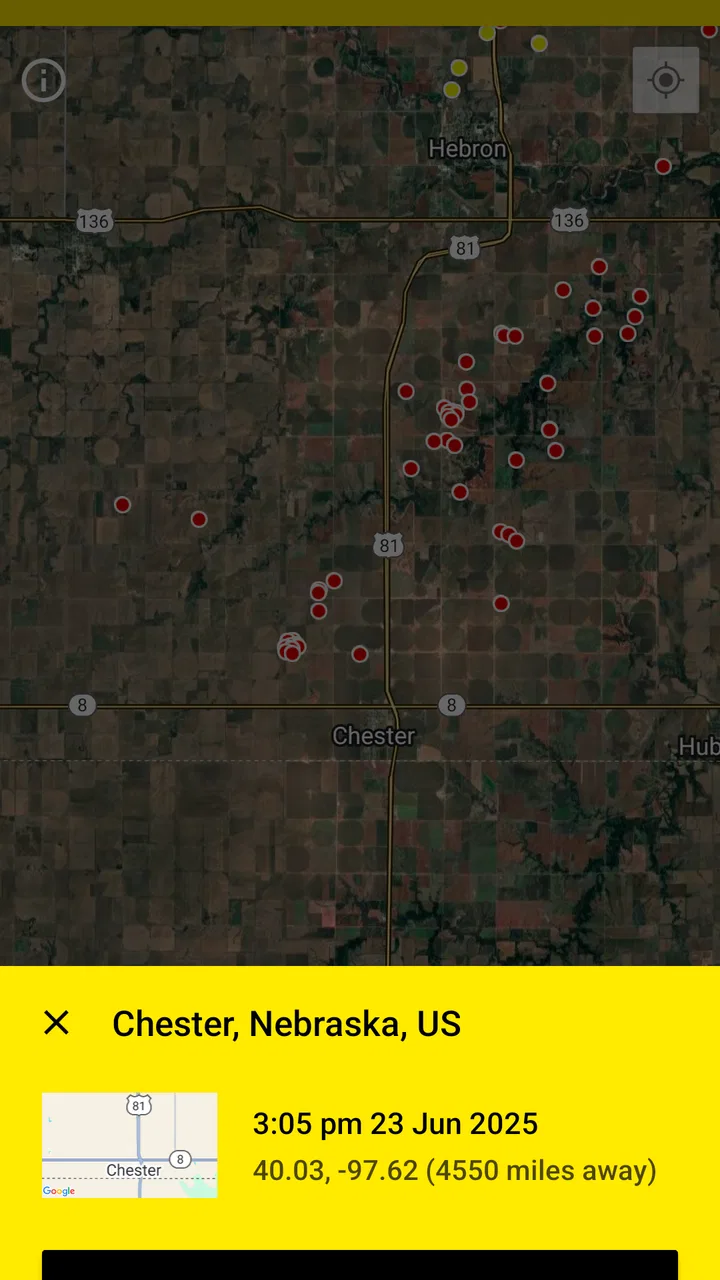
The appeal is immediate. Instead of making you interpret a general weather symbol, the app puts lightning activity at the center of the experience with a thunderstorms map, radar view, and lightning alarm. That focus makes it useful when a normal forecast feels too vague. It also means you need to understand what it is—and what it is not—before relying on it.
How the current app feels in everyday use
The first thing I noticed is that the interface is organized around location and movement. A map is much more helpful than a single sentence such as “storms likely later,” because I can look at the surrounding area and judge whether activity is approaching, passing by, or developing somewhere else. That visual context is the main reason I would keep this installed alongside a regular weather app.
You May Also Like

 Blood Strike: 2.5 Anniversary
Blood Strike’s Loadouts Turn Every Drop Into a Tactical Gamble
A close look at Blood Strike’s custom loadouts: how fast access to signature weapons reshapes its battle royale rhythm, rewards preparation, and narrows the gap between fights.

 Pandora - Music & Podcasts
Pandora’s Music Is Easy to Start, but Harder to Recover
Pandora’s strength is its low-effort path from a seed to a station. Its weak spot is how much confidence it asks you to place in connection, setup, and quiet recovery.

 8 Ball Pool
 Is Built on Rivalries, Rematches, and Routine
A close look at the rivalries, rematches, shared routines, and unanswered safety questions that turn a quick pool match into a persistent mobile community.

 Samsung Music
’s Quiet Strength Is Playing What You Already Own
Its reach comes less from spectacle than from dependable access to a personal library. That simplicity is both the app’s strongest retention engine and its ceiling.

 AccuWeather: Weather Radar
AccuWeather Review: A Quick, Clear Forecast for Everyday Decisions
For everyday plans, the best forecast is the one you can understand quickly. AccuWeather makes rain timing, radar, and local conditions easy to act on, with a few trade-offs.

 Hill Climb Racing
Why Hill Climb Racing Still Turns Crashes Into One More Run
A tiny car, a bumpy hill and one more upgrade: Hill Climb Racing keeps resurfacing because its simple chaos makes every near-miss feel personal.
More From Our News Desk



The lightning map is particularly useful when I am making a short-term decision. If I am about to leave for a walk, drive to a sports field, or start work outdoors, I can check whether strikes are appearing near the route rather than relying only on the forecast for the entire day. The map does not remove the need for judgment, but it gives the decision a more practical starting point.
The radar view adds another layer. Lightning alone tells me about electrical activity, while radar helps me understand the broader precipitation pattern around it. Looking at both together is more informative than treating either display as a complete answer. A storm can affect plans through heavy rain and wind even when the most interesting lightning activity is not directly overhead.
The alarm is the feature that changes the app from something I open occasionally into something that can work in the background of my routine. When I am concentrating on another task, I do not want to repeatedly inspect a map. An alert can prompt me to check conditions before continuing with an outdoor plan. I still treat it as a warning to reassess rather than an automatic command to panic or cancel everything.
That distinction matters for safety. A lightning tracker is a situational tool, not a substitute for official emergency guidance or sensible shelter decisions. If a storm is already close, I would not wait for a notification to tell me what to do. The best use is earlier awareness: noticing that conditions are changing and giving myself time to move indoors.
JRustonApps B.V. has kept the product narrowly focused on this purpose. That is a strength for anyone who wants storm information without digging through a crowded weather dashboard. It can also feel limited if you expect detailed forecasts, long-range planning tools, or a full set of environmental readings in one place.
The app is free, which makes experimenting with it easy. It has an Everyone content rating, and the current version is 26.0.3. Compatibility begins with Android 7.0, so it remains accessible to people using older Android phones rather than being restricted to recent hardware.
Its public reception also suggests that the concept has found a substantial audience: it has passed one million installs, with a 4.7 average from roughly forty-seven thousand ratings and about one thousand four hundred written reviews. I would not treat popularity as proof that every user will like the interface, but it does indicate that the focused lightning approach is not a niche experiment with no established user base.
What changed over the product’s life
The app was released on November 29, 2016, so its current form sits on top of a product that has had time to mature. The version number shown today is 26.0.3, which is useful context when judging it: this is not a brand-new storm map being tested for the first time. It has evolved through multiple iterations into a more established utility.
I am careful not to turn that version number into a promise about specific improvements. A higher version does not automatically tell me whether a particular map layer, alert behavior, or design detail changed in the way I would prefer. What it does suggest is that the developer has continued maintaining the app rather than leaving the original release untouched.
That evolution is visible in the product’s balance between three jobs: observing current lightning, checking radar context, and receiving an alarm. Earlier weather tools often forced users to choose between a map and notifications, while this app’s identity is built around connecting those actions. I can inspect the situation manually when planning, then use the alarm when I need the app to keep watch.
For a returning user, the important question is not simply whether the version is newer. It is whether the current workflow still feels quick enough during a changing storm. My answer is mostly yes, provided I use it for short-term awareness rather than trying to turn it into a complete forecasting workstation.
One practical improvement in thinking about the app is to separate “seeing” from “deciding.” The map is for seeing where activity is located. The radar helps me see the surrounding weather pattern. The alarm is for reminding me to look again. The actual decision—stay out, change route, postpone an activity, or seek shelter—still belongs to me.
How existing users can get more from it
If I were setting this up for a friend, I would begin with a simple routine rather than leaving notifications to run without thought. Before an outdoor activity, I would open the map and radar together, note the direction of nearby activity, and then decide when an alert would be useful. This avoids the common mistake of treating one notification as a full weather briefing.
A second useful habit is checking the app at transition points. For example, I might look before leaving home, again before starting an outdoor appointment, and once more if the sky changes noticeably. That is more efficient than staring at the map continuously, and it reduces the chance of ignoring repeated alarms because they arrive when I am not ready to act.
The app is also well suited to people whose plans move across a local area. A runner, cyclist, delivery worker, groundskeeper, or event volunteer can use the map to add geographic context to a decision. The key benefit is not merely knowing that lightning exists; it is comparing activity with the places the person actually needs to reach.
For families, I would use it as a conversation starter rather than handing responsibility to the phone. A notification can be the cue to bring children inside, pause a game, or review the route home. It should not become an excuse to remain outside until the alarm arrives. In fast-changing weather, visual signs, local instructions, and common-sense shelter choices remain important.
Another non-obvious trade-off is attention. A lightning alarm is valuable precisely because it interrupts normal activity, but interruptions can become noise if the user enables it without a clear purpose. Someone who lives in a storm-prone area may receive enough alerts that they start dismissing them automatically. I would therefore use the app for periods when outdoor awareness matters most, instead of assuming every notification deserves the same response.
Existing users should also remember that a map encourages precise-looking conclusions. A marker or radar pattern can make the situation feel more exact than it really is from a personal safety perspective. I use the display to understand trends and proximity, not to calculate a private “safe enough” boundary. When the weather is severe, a conservative decision is more valuable than squeezing another few minutes from an activity.
Where it beats ordinary weather alternatives
Compared with a standard weather app, this one gets to the relevant information faster when the concern is lightning. General apps are often better for hourly temperatures, broader daily planning, and a wide collection of forecast details. They may tell me that thunderstorms are possible, but that wording does not always help me decide whether to leave now or wait.
Compared with a basic radar app, the dedicated lightning focus is easier to understand when electrical activity is the main concern. A general radar display can show rain bands clearly while requiring extra interpretation to connect them with thunderstorm risk. Here, lightning is not a secondary detail hidden among many layers; it is the reason to open the app.
Compared with relying on visual observation alone, the app gives me a wider view. Dark clouds over my street tell me what is happening nearby, but a map can show whether the larger pattern is moving toward my destination. That is especially useful before a trip, when conditions at home may look calm even though the route ahead is becoming less suitable for outdoor stops.
Still, a dedicated tool is not automatically the best single app. If my main need is tomorrow’s temperature, a week of planning, or a detailed forecast for travel, I would choose a broader weather service first and keep this one as a specialist companion. If I need official emergency instructions, I would look to the relevant local authority rather than assuming a tracker can replace them.
The best combination is therefore complementary: use a normal forecast app for the day’s plan, then use this app when thunderstorms become a real possibility. That division keeps each tool doing what it does best and prevents the lightning map from being overloaded with expectations it was not designed to meet.
Remaining gaps and situations where I would skip it
The focused design has an unavoidable limitation: it does not make every weather question disappear. I would not install it as my only weather source if I regularly need detailed planning information beyond storms. The app earns its place through fast, specialized awareness, not through being an all-purpose meteorological dashboard.
There is also a human limitation in the alarm system. An alert can arrive after activity has already begun, and a quiet period does not guarantee that conditions will remain quiet. I would never use the absence of an alarm as permission to ignore a threatening sky or local safety advice. The feature is most valuable when it buys time, not when it is treated as a guarantee.
Map-based information can also demand more interpretation than a simple forecast icon. New users may initially wonder how close activity needs to be before changing plans, or how to relate the display to a moving route. My advice is to use it repeatedly during ordinary weather so the map becomes familiar before a stressful storm arrives.
People who dislike notifications should think carefully about whether the alarm will help or annoy them. The app’s central advantage depends on timely attention, but that same quality can be disruptive during work, sleep, driving, or meetings. I would rather configure a deliberate monitoring routine than enable every possible interruption and then stop taking any of them seriously.
Finally, anyone using an older Android phone should check that it meets the Android 7.0 minimum before planning around the app. For compatible users, the free price lowers the barrier to trying it. For iPhone users, the relevant question is whether the version available on their platform offers the same workflow; I would verify the platform-specific listing before depending on a particular behavior.
What I would watch as the app continues
The next stage of improvement should preserve the app’s clarity. I would rather see the lightning map, radar, and alarm become more dependable and easier to interpret than see the product expand into a cluttered collection of unrelated weather tools. Its identity is strongest when I can open it during a developing storm and understand the situation quickly.
I would also watch how the current version handles the balance between useful alerts and notification fatigue. For a product like this, the quality of the warning experience matters as much as the map itself. An alarm that arrives at a useful moment can change a decision; an alarm that is difficult to interpret or too frequent can train users to ignore the feature.
For existing users, the practical takeaway is simple: keep the app for storm awareness, but pair it with good judgment and a broader forecast source when you need more than lightning information. For new users, the free download makes it reasonable to test during the next period of unsettled weather and see whether the map-and-alarm workflow fits your routine.
My final view is positive but specific. This is a specialist weather tool, not a universal forecast replacement. I recommend it to anyone who spends meaningful time outdoors, manages changing plans, or wants a clearer way to monitor nearby thunderstorm activity. I would skip it if I only want temperatures and daily forecasts. Used for the right job, its focused design is exactly what makes it worthwhile.
FAQs for My Lightning Tracker & Alerts
01What features does My Lightning Tracker & Alerts offer?
My Lightning Tracker & Alerts provides real-time lightning strike information with detailed maps and notifications. It offers customizable alerts for your specific location, ensuring you receive timely warnings about approaching storms. The app also includes historical data, allowing you to track lightning patterns over time, and a sleek, user-friendly interface.
02Is My Lightning Tracker & Alerts free to use?
Yes, My Lightning Tracker & Alerts is available as a free download for both Android and iOS devices. The free version includes essential features, but there may be in-app purchases or a premium version offering additional functionalities such as ad-free usage or more detailed alert customization.
03How accurate is the lightning data provided by the app?
The app sources its data from reliable weather networks, ensuring high accuracy. It provides real-time updates on lightning strikes worldwide and uses advanced algorithms to predict potential storm paths. While no app can guarantee 100% accuracy, My Lightning Tracker & Alerts is designed to be as precise as possible.
04Can I customize the alerts in My Lightning Tracker & Alerts?
Yes, the app allows you to customize alerts based on your preferences. You can set notifications for specific distances from your location, choose the type of alerts you receive, and even silence alerts during certain hours. This flexibility helps users receive relevant updates without being overwhelmed by notifications.
05Does My Lightning Tracker & Alerts drain battery life?
The app is optimized to minimize battery usage by using efficient algorithms and allowing users to adjust update frequency. However, real-time tracking and frequent notifications can impact battery life. Users can manage settings to balance between timely alerts and battery conservation.
Pros
- Real-time lightning alerts keep you informed.
- Easy-to-use interface for quick navigation.
- Customizable notifications for specific areas.
- Detailed storm maps with radar integration.
- Ad-free experience enhances usability.
Cons
- Limited offline functionality.
- Some features require in-app purchases.
- Occasional delays in alert delivery.
- Battery usage can be high with constant updates.
- Weather data accuracy can vary by region.

My Lightning Tracker & Alerts
Gallery